
You run the store through a Shopify app detector. The result comes back with reviews, popups, bundles, subscriptions, tracking, returns, loyalty, maybe a helpdesk.
Most people stop there. They screenshot the app list, copy a few names, and call it competitor research.
That is too shallow. The app names are not the insight. The real question is: what job is each app doing for the store?
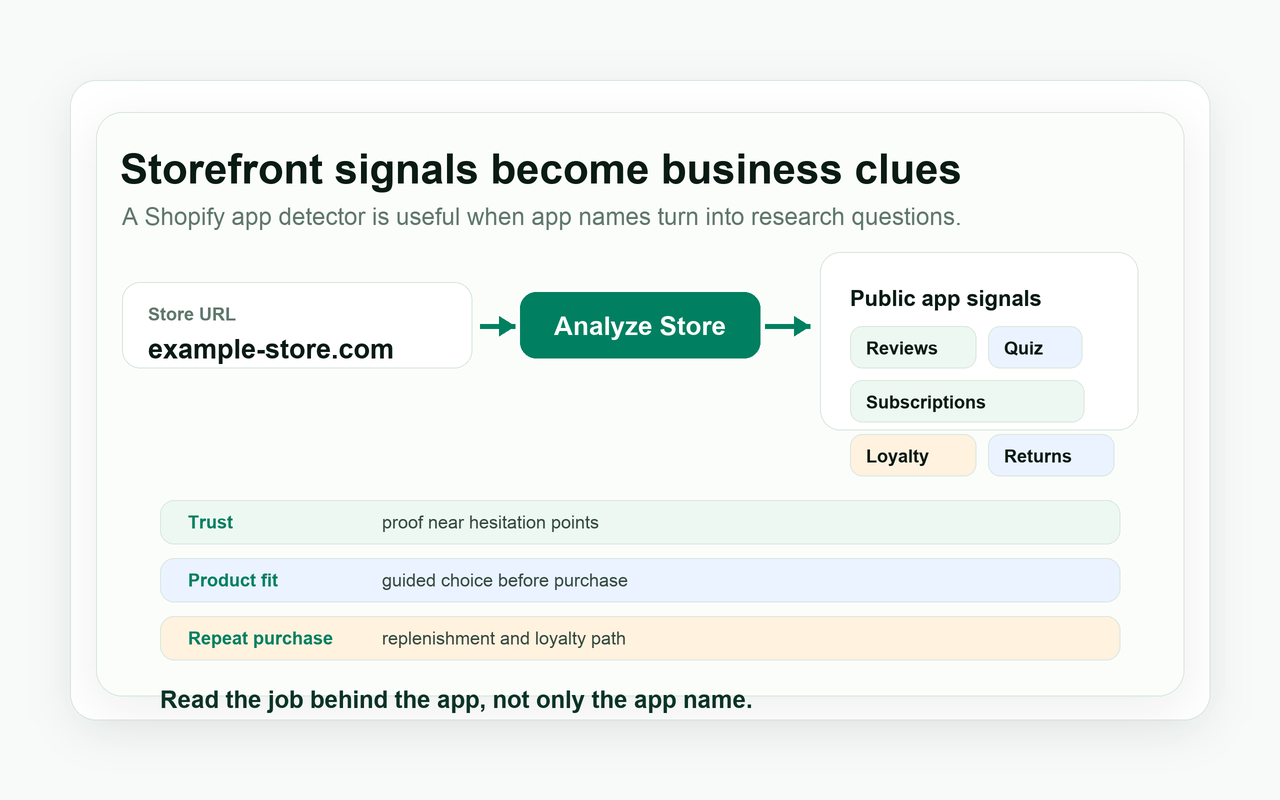
Experienced operators read public app signals the way a good merchandiser reads a product page. Reviews may be trust work. A quiz may be product education. A subscription widget may be replenishment. The visible signal is useful, but it is not the whole truth.
Short Answer
A Shopify app detector helps identify public app signals on a Shopify storefront. The useful workflow is to group those apps by business job, such as acquisition, conversion, trust, retention, support, subscriptions, and operations, so a simple app list becomes a map of how the store grows.
A detected app is not the answer. It is a clue.
Table of Contents
- What Is a Shopify App Detector?
- Why Shopify App Detection Matters
- What a Shopify App Detector Can and Cannot See
- Read the App Stack as a Storefront Operating System
- How to Use a Shopify App Detector Step by Step
- Example Analysis
- Common Mistakes
- How to Use ShopEyes
- Shopify App Detection Checklist
- FAQ
What Is a Shopify App Detector?
A Shopify app detector is a tool that analyzes public storefront signals to identify apps that may be used by a Shopify store. These signals can include visible widgets, storefront scripts, review blocks, popup tools, subscription modules, tracking pixels, and other front-end elements.
The word "may" matters. A detector can often identify an app when that app leaves a public fingerprint. It can read review widgets, email capture forms, subscription blocks, quiz modules, loyalty widgets, search tools, helpdesk embeds, returns portals, tracking pixels, and app-related scripts.
It cannot see everything. A Shopify store may use private custom apps, backend-only tools, server-side integrations, warehouse systems, ERP connectors, fraud tools, analytics pipelines, or custom code that does not expose a clear storefront signal. Treat detection as evidence, not a confession from the store.
Why Shopify App Detection Matters
For store owners
Store owners can learn how similar stores solve trust, conversion, retention, and post-purchase problems. If comparable stores show reviews, product education, subscriptions, and clear returns support, the lesson is not "install four apps." Buyers in that category may need reassurance before and after the order.
For agencies
Agencies can prepare sharper audits and outreach. A lazy email says, "We can improve your store." A useful note says, "Your product page has proof, but the replenishment and post-purchase path look thin compared with similar stores." Public signals give the conversation a spine.
For app developers
App developers can spot lead patterns and category opportunities. A store using adjacent tools may already understand the workflow your app supports. A category where many stores use quizzes, subscriptions, or loyalty tools may reveal a market that already feels the problem.
For growth teams
Growth teams can make Shopify competitor research less subjective. Instead of judging a store only by design taste, they can ask what the app stack suggests about acquisition, trust, education, retention, and support. That is a better starting point for experiments.
Do not copy the tool. Understand the job.
What a Shopify App Detector Can and Cannot See
A Shopify app detector can only read public or visible storefront signals. It cannot guarantee detection of every private, backend, server-side, or custom integration. The absence of a visible signal does not prove the tool is absent.
| Signal type | Usually visible? | Example | How to read it |
|---|---|---|---|
| Review widgets | Often | Stars, review counts, photo reviews, rating snippets. | The store may be reducing buyer doubt with social proof. |
| Popups and email capture | Often | Welcome offer, exit intent, quiz signup, drop alerts. | The store may be trying to capture demand before purchase. |
| Subscription widgets | Often | Subscribe and save block, recurring order selector. | The product may support repeat purchase or replenishment. |
| Loyalty and rewards | Sometimes | Points launcher, rewards account prompt, referral block. | The brand may be investing in repeat customer behavior. |
| Bundles and upsells | Often | Bundle builder, cart upsell, frequently bought together. | The store may be trying to raise order value or simplify choice. |
| Search and filters | Often | Predictive search, faceted filters, product recommendation blocks. | The catalog may need guided discovery. |
| Tracking and returns widgets | Sometimes | Order tracking, returns portal, delivery protection. | The store may face post-purchase anxiety or logistics complexity. |
| Backend-only tools | Rarely | ERP, warehouse, fraud, accounting, private analytics. | Do not treat absence from the page as absence from the business. |
| Private custom apps | Rarely | Custom merchandising, internal workflow, hidden logic. | The detector may not identify it by name. |
| Server-side integrations | Rarely | Custom checkout logic, backend personalization, data sync. | Public storefront research cannot verify the private stack. |
Read the App Stack as a Storefront Operating System
Here is the problem with most app research: people read one app at a time. That is how you end up with a spreadsheet full of names and no decision.
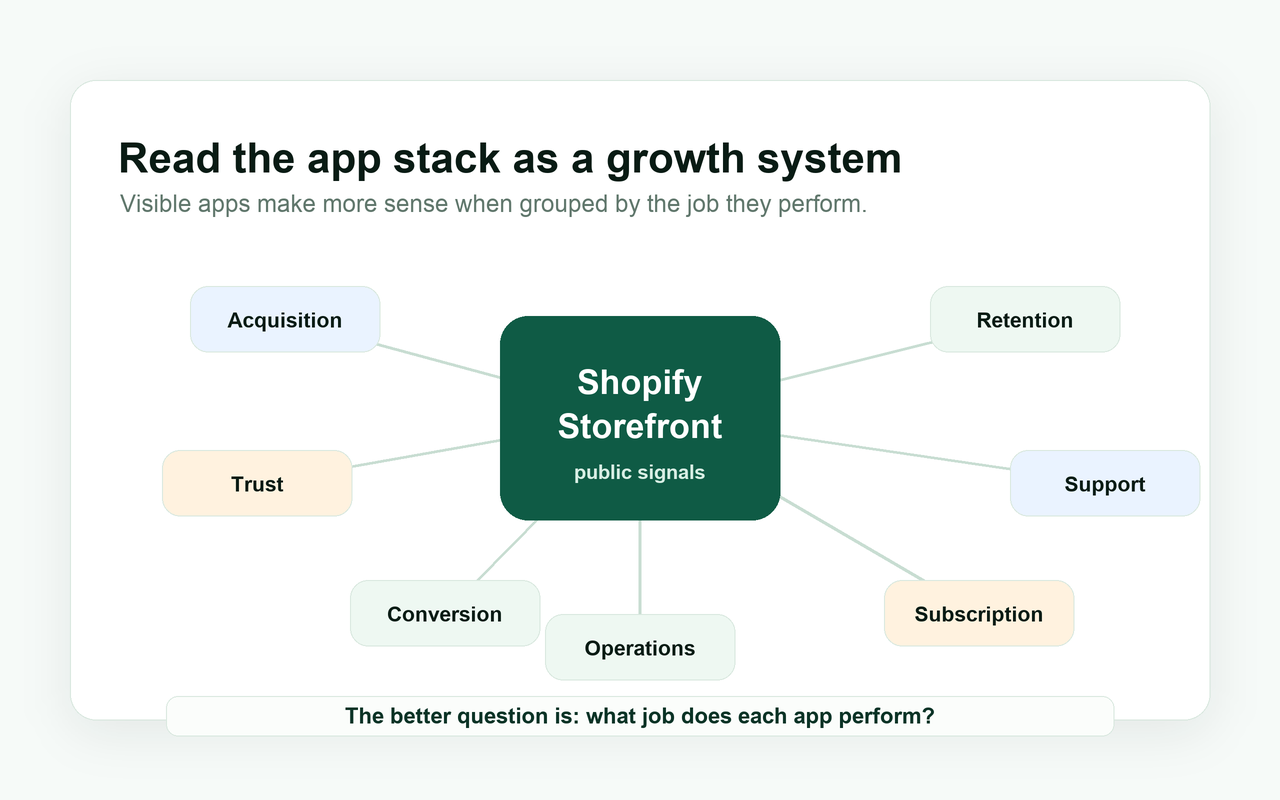
Read the stack as a storefront operating system instead. Each app may support a business job. A polished store is often not just "using apps." It is using visible tools to handle specific buyer friction.
Storefront
| Layer | What to look for | What it may mean | Question to ask next |
|---|---|---|---|
| Acquisition | Popups, referrals, lead capture, quizzes. | The store wants owned audience or qualified demand. | Is the offer strong enough to earn the email? |
| Conversion | Bundles, upsells, filters, product options. | The store is reducing decision friction or increasing order value. | What buyer hesitation is being handled? |
| Trust | Reviews, UGC, badges, proof blocks. | The category may require reassurance before purchase. | Is proof placed near the moment of doubt? |
| Retention | Email, SMS, loyalty, account prompts. | The store may be building repeat customer behavior. | Does the product support repeat purchase? |
| Subscription and repeat purchase | Subscribe options, replenishment prompts, reorder flows. | The store may be turning usage frequency into predictable revenue. | Is the subscription natural, or forced? |
| Support and post-purchase | Helpdesk, chat, tracking, returns, exchanges. | The store is managing anxiety after the order. | Which question would a customer ask before contacting support? |
| Operations and localization | Currency, translation, delivery date, compliance, shipping tools. | The store may be selling across regions or handling logistics complexity. | Does the storefront match the buyer's market? |
How to Use a Shopify App Detector Step by Step
- Enter a clean Shopify store URL. Start with the root domain, then inspect product and collection pages when the first pass is done.
- Review the detected theme and visible apps. Theme gives the storefront foundation; apps show the workflows layered on top.
- Group apps by business job. Write "trust," "conversion," "retention," or "support" before you write the app name.
- Compare the stack with the store category. A skincare store, footwear store, and home decor store do not need the same app pattern.
- Look for missing or unusual signals. A high-consideration product with no reviews may be more interesting than a store with ten common tools.
- Compare similar stores. One store is a clue. Five similar stores start to show a pattern.
- Turn the result into one research question or action. The better question is not "what app is this?" but "why would this store need it?"
Example Analysis
Hypothetical example: A Shopify skincare store. This is a fictional scenario for analysis only. It does not use real brand data.
The detector finds a review app, product quiz, subscription widget, loyalty widget, helpdesk widget, and a tracking or returns tool. A beginner sees six tools. An experienced operator sees a store trying to solve trust, product fit, replenishment, and post-purchase confidence.
Hypothetical example: Skincare Shopify Store
- Store type
- Skincare Shopify store
- What beginners see
- A list of tools.
- What experienced operators see
- A trust, education, replenishment, and post-purchase system.
- Research question
- Is this store using apps to reduce buyer anxiety and increase repeat purchase?
- Possible next action
- Compare similar skincare stores before deciding which app category matters most.
Common Mistakes
1. Copying apps without understanding the store problem
What people do: They install the same review, quiz, popup, or upsell app they saw on a strong store. Why it is a problem: The tool may solve a category-specific problem you do not have. What to do instead: Name the buyer friction first.
2. Assuming the detector can see every app
What people do: They treat the detected list as the full technical stack. Why it is a problem: Private, backend, server-side, and custom systems may be invisible. What to do instead: Label the result as public storefront evidence.
3. Reading apps one by one instead of as a system
What people do: They make a list of app names and stop. Why it is a problem: Isolated app names do not explain the store's growth logic. What to do instead: Group the apps by business job.
4. Ignoring product category
What people do: They compare a skincare store with a furniture store because both look polished. Why it is a problem: Product risk, purchase frequency, and buyer anxiety differ. What to do instead: Compare stores with similar category pressure.
5. Judging the store only by design
What people do: They admire layout and typography, then miss the operational signals. Why it is a problem: A beautiful store can still have weak trust, search, support, or retention paths. What to do instead: Read theme, apps, product structure, and support together.
6. Analyzing one store without comparison
What people do: They treat one competitor as the playbook. Why it is a problem: It may be an outlier, a test, or a store with different economics. What to do instead: Compare several similar stores before acting.
How to Use ShopEyes
ShopEyes is designed for public Shopify storefront research. You can enter a store URL, check the detected theme, review visible apps, and use related top data pages to compare patterns across Shopify stores.
The result should not be treated as a private technical audit. Treat it as a structured signal layer that helps you ask better questions faster: more specific than browsing by eye, more careful than pretending public signals reveal everything.
Shopify App Detection Checklist
Before you turn a detection result into a recommendation
- Clean store URL entered
- Theme result reviewed
- Visible apps checked
- Apps grouped by business job
- Store category considered
- Product complexity considered
- Public-signal limitations acknowledged
- Similar stores compared
- One research question created
- One next action selected
FAQ
What is a Shopify app detector?
A Shopify app detector is a research tool that reads public storefront signals and identifies apps that may be used by a Shopify store. It can surface visible widgets, scripts, review blocks, subscription modules, popups, and other front-end evidence. Use it to understand store behavior, not to claim private certainty.
Can a Shopify app detector find every app?
No. A detector can only find apps that leave visible or public signals. Backend tools, private custom apps, server-side integrations, warehouse systems, analytics pipelines, and internal workflows may not appear on the storefront. Absence from a detector result is not proof that a tool is absent.
How does a Shopify app detector work?
It checks public page assets, scripts, widgets, request patterns, markup, and known app fingerprints. Some apps are easy to recognize because they render storefront modules. Others are bundled, customized, or hidden. The best use is to treat the result as a starting point for structured research.
Why should I detect apps used by a Shopify store?
App detection helps you understand how a store may be solving buyer problems. Reviews may point to trust work, quizzes to product education, subscriptions to repeat purchase, and returns tools to post-purchase anxiety. The value is not the app name alone; it is the business job behind it.
Is Shopify app detection accurate?
It can be accurate for apps with public storefront fingerprints, but accuracy varies by app, theme, customization, and implementation. Some tools expose clear widgets. Others leave weak or no visible evidence. Good research keeps a distinction between detected signals, likely interpretation, and unproven assumptions.
Can I use app detection for competitor research?
Yes, as long as you use it carefully. App detection can show visible workflows behind a competitor's storefront, such as trust, conversion, retention, and support. It cannot reveal revenue, conversion rate, customer data, ad strategy, or private operations. Use it to ask better questions, not to copy blindly.
How should agencies use Shopify app detection?
Agencies can use app detection to prepare sharper audits and outreach. Instead of sending generic claims, they can reference public signals: review placement, missing product education, weak post-purchase support, or a messy app layer. The tone should stay practical because public evidence is useful but incomplete.
What should I do after detecting apps on a Shopify store?
Group the apps by business job, compare the store with similar stores, acknowledge public-signal limits, and write one research question. Then choose one action: run a store audit, qualify a lead, compare app categories, test a workflow, or decide that the signal is not relevant.
Read the job behind the app
A Shopify app detector is most useful when you stop reading the result as a list of tools and start reading it as a map of business choices.
The app name is the visible part.
The real insight is the job behind it.